
Every stem,
every album,
one queue.
Bounce automation for Pro Tools. Queue your sessions, press Bounce, get an email when it’s done.
Why Fast Bounce
Simple. Smart. Fast.
Simple
5 min
from install to your first bounce
A simple, predictable workflow you learn once and use everywhere.
Smart
Save once
reuse on every project
Create presets that fit any session built on your template.
Fast
2 min
to set up hundreds of bounces for a whole album
Load multiple sessions at once, apply your presets to all of them.
How it works
Many deliverables, few clicks
Set your bounce parameters, then choose a mode.
Bounce mode
Mix
The whole mix, exactly as the session plays. No track selection needed.
Good forThe mix of the song
More on Mix, Solo and MuteThe whole mix, exactly as the session plays.
Features
From session to delivery
Load a whole album at once
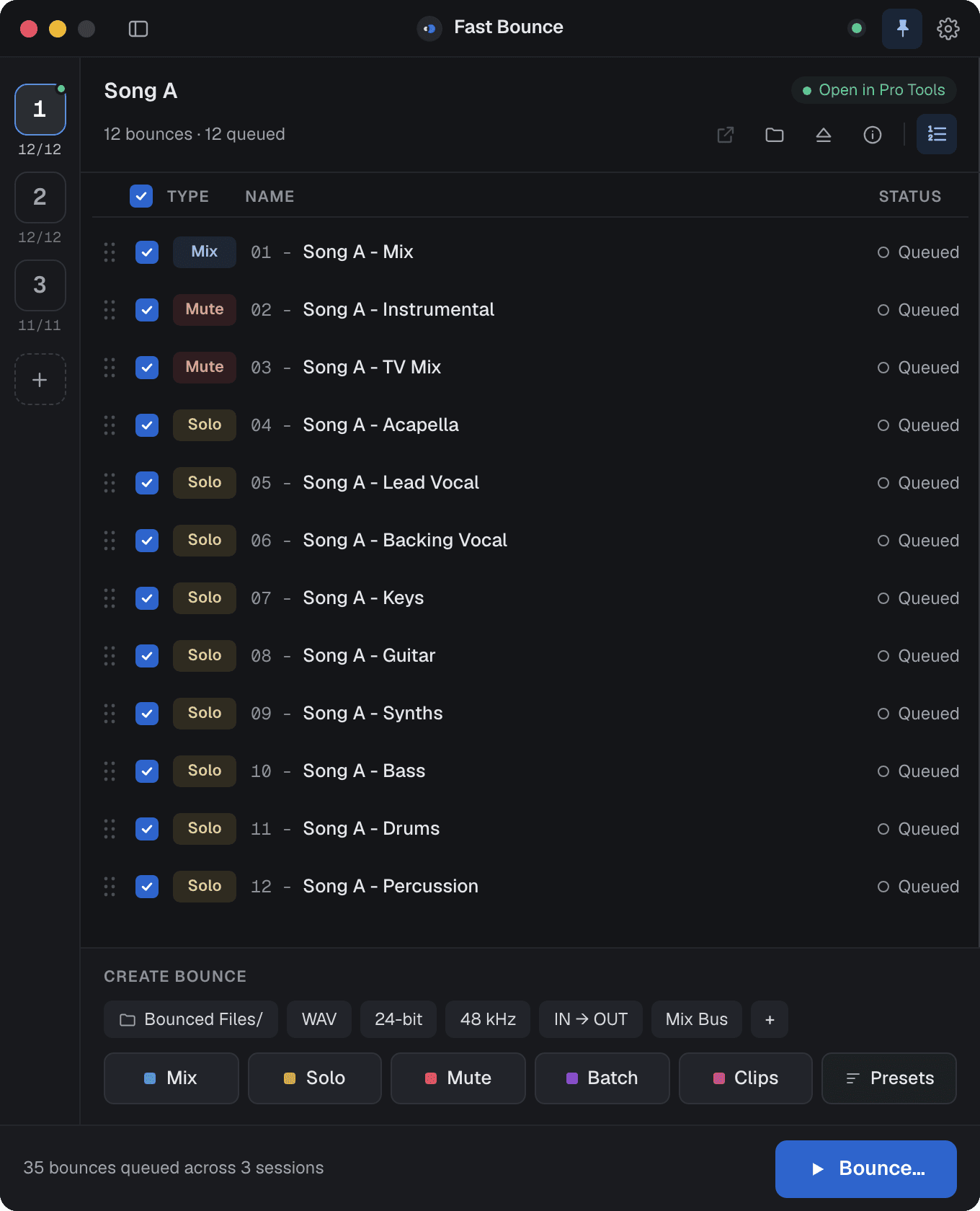
Drop in every session and apply your presets to all of them in one pass.
Add several sessions at once, then apply presets to all of them.
- 1Sessions
- 2Presets
- 3Check
- 4Name
Your delivery spec, everytime
Presets fit any session built on your template, and flag a missing track before anything bounces.
Manage and add presets.
- 1Choose
- 2Check
- 3Name
Press Bounce, let it run
Fast Bounce switches sessions, bounces every file and emails you a summary when the last one lands.
Demo
Try the whole app
8 sessions, 67 bounces. Click anything.
 Fast Bounce
Neon Skyline
Open in Pro ToolsPlans
Start free, upgrade anytime
Pick your plan that fits your needs.
Subscription
7-day trialThe whole app, monthly or yearly.
- Unlimited bounces
- Whole-album runs
- Email reports
FAQ
Questions engineers ask first
Is Fast Bounce only for Pro Tools?
Yes. It drives Pro Tools 2024.10 or later through Avid’s scripting library, on macOS and Windows.
Can I use the computer while it bounces?
Yes. Pro Tools bounces in the background, so work in other apps or step away.
Does it handle realtime bounces for outboard gear?
Yes. Turn on Realtime bounce in the options chip and hardware inserts bounce exactly as you hear them.
Does it record to audio tracks?
No. It uses Pro Tools’ bounce engine and never records into your session.
Do I need a new license for v2?
No. One account signs in to v1 and to the v2 beta, and every plan includes updates.
Does it work offline?
Bouncing never needs a connection. Perpetual licenses also sign in offline, on one computer per seat.
Requirements
Runs where Pro Tools runs
macOS
macOS 12.7 or later, universal build for Apple silicon and Intel
Windows
Windows 10 (22H2) or Windows 11
Pro Tools
Pro Tools 2024.10 or later
Start bouncing for free
Create a free account. No card needed.